
Table of Contents
- What the function does
- Current signature and parameters
- Return values
- Safe helper example
- Level groups and existing access
- Hooks fired around the change
- Common mistakes
- Conclusion
What the function does
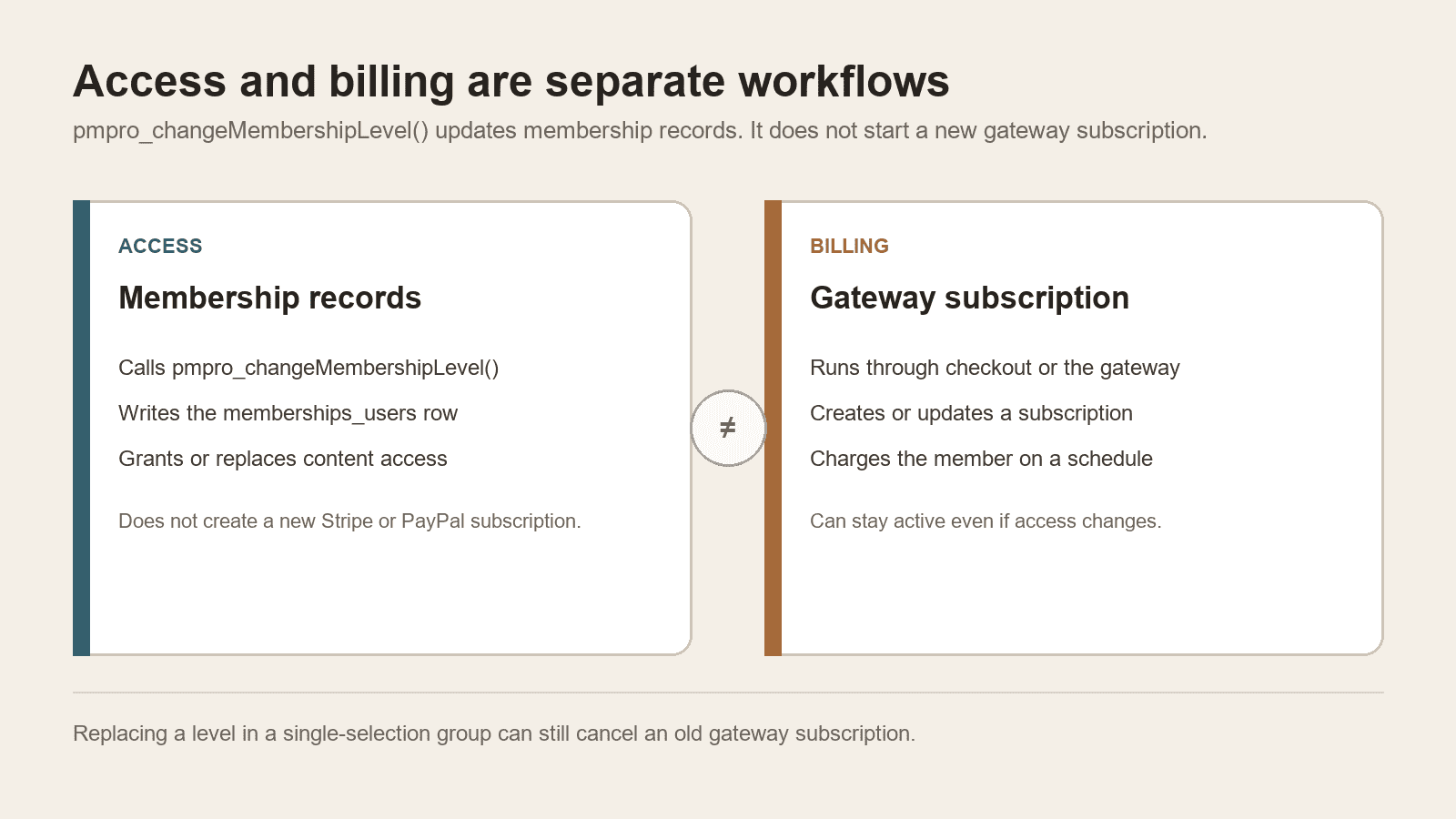
pmpro_changeMembershipLevel() assigns a Paid Memberships Pro level to a user and updates PMPro's membership records. In current PMPro code it also applies level-group rules, so another active level in the same group can be changed or cancelled.
The common call is:
pmpro_changeMembershipLevel( $level_id, $user_id );
Use it for a deliberate access change after your application has already decided which user and level are valid. Rechecked against the current PMPro dev source on 1 September 2026.
It does not charge a card, create a new gateway subscription, or reproduce checkout. Paid Memberships Pro treats memberships and subscriptions as different objects: memberships control content access, and subscriptions manage recurring payments.
Current signature and parameters
The current development source defines:
pmpro_changeMembershipLevel(
	$level,
	$user_id = null,
	$old_level_status = 'inactive',
	$cancel_level = null
);
$level
Pass a numeric membership-level ID for the normal case. That path inserts a new memberships_users row with zero billing amounts and an empty end date (0000-00-00 00:00:00). It does not copy the level's checkout price or expiration settings.
PMPro also accepts a custom level array. The array must include membership_id. Use that advanced path only when you need specific start, end, or billing snapshot values, and test it on staging first.
Older examples may pass 0 to cancel memberships. Current PMPro marks that cancellation route as deprecated and directs developers to pmpro_cancelMembershipLevel().
$user_id
The WordPress user ID. If omitted, the function tries to use the current user. Supplying the ID explicitly makes background jobs, webhook handlers, and admin tools easier to reason about.
$old_level_status and $cancel_level
These parameters are retained for compatibility but are deprecated for cancellation workflows. New code should use pmpro_cancelMembershipLevel().
Return values
Current PMPro source documents three outcomes:
truewhen the change succeeds;falsewhen it fails;nullwhen the user already has the requested level and no change is required. The source uses a barereturn;, which isnullin PHP.
Do not treat a falsey result as one undifferentiated failure. A strict comparison lets your integration distinguish an error from an intentional no-op.
Safe helper example
The helper below validates PMPro availability, the user, and the level before changing access. It returns true on success or a WP_Error that the caller can log or display safely. A no-change result is returned as an error so it is not mistaken for success.
/**
 * Assign an existing PMPro level to a WordPress user.
 *
 * @param int $user_id  WordPress user ID.
 * @param int $level_id PMPro membership level ID.
 * @return true|WP_Error
 */
function yoohoo_assign_pmpro_level( $user_id, $level_id ) {
	$user_id  = absint( $user_id );
	$level_id = absint( $level_id );

	if ( ! function_exists( 'pmpro_changeMembershipLevel' ) || ! function_exists( 'pmpro_getLevel' ) ) {
		return new WP_Error( 'pmpro_unavailable', 'Paid Memberships Pro is not available.' );
	}

	if ( ! get_userdata( $user_id ) ) {
		return new WP_Error( 'invalid_user', 'The WordPress user does not exist.' );
	}

	if ( ! pmpro_getLevel( $level_id ) ) {
		return new WP_Error( 'invalid_level', 'The PMPro membership level does not exist.' );
	}

	$result = pmpro_changeMembershipLevel( $level_id, $user_id );

	if ( true === $result ) {
		return true;
	}

	if ( null === $result ) {
		return new WP_Error( 'no_change', 'The user already has this membership level.' );
	}

	return new WP_Error( 'change_failed', 'PMPro could not change the membership level.' );
}
Call this helper only from an authorised, validated workflow. Do not add a snippet that changes a hard-coded user on every page load. If the member needs a specific expiration date, do not rely on this numeric-ID helper; pass a tested custom level array instead.
Level groups and existing access
Modern PMPro supports multiple membership levels through level groups. When a group allows only one selection, assigning a new level can change the user's existing active level in that group.
That replacement is not only a database access change. Current source cancels the other active levels in that group through pmpro_cancelMembershipLevel(). By default that function also cancels matching gateway subscriptions, unless the pmpro_cancel_previous_subscriptions filter returns false.
Before calling the function, decide whether your business rule means:
- add another level in a group that permits multiple selections;
- replace the current level in a single-selection group, knowing the old gateway subscription may be cancelled;
- cancel a specific level with
pmpro_cancelMembershipLevel(); - process a paid upgrade or downgrade through checkout so the new level gets a matching gateway subscription.
The last item usually needs more than a direct membership-row assignment. See PMPro's subscriptions documentation for the current distinction between access and billing.
Hooks fired around the change
PMPro first filters the incoming level with pmpro_change_level. It then fires pmpro_before_change_membership_level before it changes the records and pmpro_after_change_membership_level after the change.
Current source passes:
- before: new level ID, user ID, the user's prior levels, and a cancel-level argument (null on the add path);
- after: new level ID, user ID, and the cancel-level argument (null on the add path).
When several levels change in one request, PMPro's docs recommend pmpro_after_all_membership_level_changes, which fires once after the full set of changes.
If your site uses WP Zapier, the outbound event PMPro – After Change Level listens to pmpro_after_change_membership_level and can send the user and new level ID to another service. Keep billing data and personal data out of the payload unless the destination genuinely requires them.
After a level change, PDF Invoices for Paid Memberships Pro still depends on order and invoice data. Changing access in code does not by itself create a paid order or a new invoice PDF.
Common mistakes
Assuming the function charges the member
It changes PMPro access records. It does not create a new remote subscription at Stripe, PayPal, or another gateway.
Assuming the old subscription is left untouched
In a single-selection group, replacing a level can cancel the previous gateway subscription. Test that path on staging with a real test gateway customer.
Expecting the level's expiration date to copy across
Passing a numeric level ID grants ongoing access with an empty end date. Copy expiration or billing snapshot values only through a custom level array.
Running it too early
Check that PMPro functions exist. A plugin file loaded before PMPro has initialised may not be able to call the function.
Using cancellation parameters from an old snippet
Use pmpro_cancelMembershipLevel() for current cancellation code.
Ignoring no-change results
A user who already has the level can produce null. Handle it separately from a database failure.
Forgetting emails and downstream automations
Hooks attached to membership changes may send email, sync a CRM, or update access elsewhere. Test the complete workflow on staging with a test user.
Conclusion
Use the pmpro_changeMembershipLevel function when your code needs to assign an existing PMPro level to a validated WordPress user. Pass explicit IDs, distinguish success, failure, and no-change results, understand the level-group behaviour, and use the dedicated cancellation API for removals.
Most importantly, do not confuse a membership access change with payment-gateway billing.
What membership change are you handling in code, and does it also need a matching gateway subscription?